 |
 | IPro Series 40 Restaurant Inventory, Recipe & Menu Software
IPro restaurant and general food service inventory and recipe cost control software dramatically reduces food and beverage costs by detecting creeping costs, overuse, theft and unknown costs. IPro features periodic and perpetual inventory for food, liquor and supplies, build-to-par ordering, purchase history, vendor comparison, recipe costing and resizing, recipe printing, stock depletion by sales or production, sales and profit history, trends and analysis, and much more. Compare this program to others at ten times the price! Downloadable for immediate and free delivery.

IPro Series 40 Demo
IPro Series 40 Details
IPro Series 40 Tour
Features Summary
More IPro Series 40 Features
Restaurant Inventory & Recipe Costing Products | IPro Restaurant Inventory,
Recipe & Sales Software Features - Inventory Control
- Recipe Costing & Resizing
- Ordering & Purchase History
- Ideal & Actual Cost Analysis
- Sales & Profit Analysis
| Product Group Guides |
Contact Us
Info, Quotes & Orders:
805-375-7000
Email:
contact@FoodSoftware.com
Advanced Analytical, Inc.
Newbury Park, CA 91320
|
We Accept
All Major Credit Cards
|
No Sales Tax
(except California) |
|
Revised: 4/1/2024
|
|
|
> Home >
IPro Series 40 Restaurant Inventory, Recipe & Menu Software
| |
|
|
|
|
Our Price: $49.95
Options and their Prices? Click an Add to Cart button (above, left or right).
More Details? Keep scrolling -- this listing may be very long.
Related Products? Look in the left margin.
Purchase Now? Click an Add to Cart button (above, left or right).
Questions or Custom Orders? Call: 805-375-7000
|
|
|
|
Custom Report Setup Example
Reports often need to be customized to be meaningful, so IPro has an extremely
powerful report writer (below). IPro has more than 50 built-in reports for
food cost, liquor cost, vendor history, menu profit contribution and so on.
But most importantly, you can customize the standard reports and add new
ones.
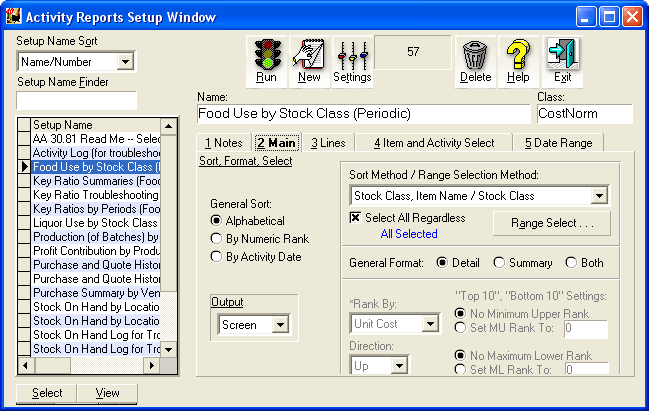
Activity Reports Setup Window Example (above)
You can organize reports alphabetically, by rank or by date. Select or filter
report items by classes, ranges, individual items or combinations thereof
for total flexibility. Let reports span any range of time-- any day to any
day for weeks, months or years. (IPro stores unlimited transaction detail
in its Activity File.) Simplify reports with "floors" and "ceilings" that
filter out unimportant items. Print to the screen, paper or export to files.
Any report setup work that you do is saved in setup files, so do the work
once and after that just call up the setup and click the Run button.
|
| |
|
|
|
|

